Best Xfinity Phone Internet Buying Guide — Black Friday Deals 2026
Choosing equipment for Xfinity phone internet starts with a service question: do you need a modem for a separate router, or would you rather combine networking and voice functions in one device? The three options here address different arrangements, from a modem with an Ethernet connection for your own router to integrated modem-router units. Their listed Xfinity compatibility and speed qualifications are not interchangeable, so first match the details to your plan and phone service. During Black Friday, compare the exact model and included configuration rather than relying on a broad deal headline. The right shortlist is the one that fits how you use internet and voice, not simply the one with the longest feature list.
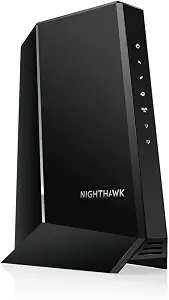
NETGEAR Nighthawk Multi-Gig Cable Modem for Xfinity Voice (CM2050V)
The NETGEAR Nighthawk CM2050V is the Best Overall choice in this group for shoppers who want an Xfinity-compatible voice modem but prefer to select a WiFi router separately. It is certified by Xfinity and described as ideal for Xfinity’s Triple Play plan. Its cable-plan compatibility is listed for plans up to 2.5Gbps, which gives shoppers with a plan in that range a relevant qualification to check. The model supports up to two telephone lines, so it is worth considering when voice service is part of the household setup rather than treating the phone connection as an afterthought.
Its layout puts the modem’s networking handoff at the center of the decision: the CM2050V has one 2.5Gbps Ethernet port, and the listed setup allows any WiFi router to connect to that port. That can suit someone who already has a router they want to keep using, or who prefers to make the router choice independently. It also means the shopper should account for the router as a separate part of the arrangement rather than assuming this is an all-in-one WiFi unit. For Black Friday, check whether the listing is for this exact modem model and whether a router is actually part of the offer before comparing it with combo devices.
This option makes the most sense when Xfinity voice support, the plan qualification and a separate-router approach all line up with your priorities. The Best Overall label is an editorial fit among these three products, not a claim that it is superior for every home or plan. If you need an integrated WiFi router, the C7100V or MT8733 may better match that layout; if you want to choose your own router, the CM2050V’s Ethernet connection is a useful distinction. Before a Black Friday purchase, confirm that your particular Xfinity service and intended router arrangement suit the product’s stated compatibility.
Key specs
Cable plan compatibility
Best for cable provider plans up to 2.5Gbps.
Provider compatibility
Certified by Xfinity and ideal for Xfinity’s Triple Play plan.
Phone line support
up to 2 telephone lines
Router connection
Connect any WiFi router to this modem’s Ethernet port
Ethernet
1 x2.5Gbps Ethernet port
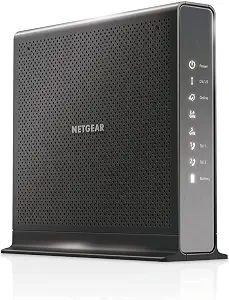
NETGEAR Nighthawk Cable Modem WiFi Router Combo with Voice C7100V
The NETGEAR Nighthawk C7100V is the Best for All-in-One Setup pick for shoppers who want modem, WiFi router and Xfinity Voice functions combined. Its listed three-in-one design includes a DOCSIS 3.0 cable modem, AC1900 WiFi router, Xfinity Voice and two USB ports. For someone looking to keep those named functions in one device, that combination may make the choice more straightforward than assembling a modem and router separately. Its compatibility is specified for Xfinity Cable and Voice plans up to 600Mbps, so compare that qualification with your actual plan rather than assuming it suits every speed tier.
The C7100V has two VoIP ports and four Gigabit Ethernet ports. Those connections matter in different ways: the phone ports relate to the listed voice function, while the Ethernet ports provide wired connection options for compatible equipment. Its wireless details include dual-band operation, beamforming, Guest Mode, LED Indicator and WPS. Consider which of those named features you expect to use instead of treating a longer list as automatically more useful. Optional battery backup is also specified, with up to eight hours of standby and five hours of talk time during power outages. It is an optional feature, so check the exact listing and configuration if backup matters to your decision.
This model is a practical direction for shoppers who value an integrated arrangement and whose service fits its stated Xfinity plan qualification. Its Best for All-in-One Setup label describes that intended fit among the products here; it does not establish a market-wide ranking. Compared with the CM2050V, it combines a router with the modem, while the MT8733 is another integrated alternative with WiFi 6 and a different speed qualification. Around Black Friday, verify that the listing names the C7100V and check whether any advertised bundle includes the configuration you want. Do not infer a discount or added accessory from a promotional headline alone.
Key specs
Compatibility
Compatible with Xfinity Cable & Voice Plans up to 600Mbps speed.
Functions
Three-in-one DOCSIS 3.0 Cable Modem + AC1900 WiFi Router+ Xfinity Voice and 2 USB ports
Phone and Ethernet ports
2 Voice over IP (VoIP) Ports and 4 Gagabit Ethernet Port.
Battery backup
Optional battery backup for power outages with up to 8 hours of standby and 5 hours of talk time
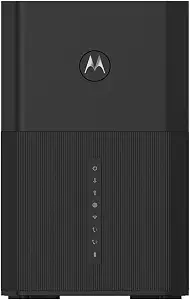
The Motorola MT8733 is the Best for WiFi 6 and Xfinity Voice option for shoppers seeking an integrated router-modem with phone connections. It is compatible with Xfinity Internet and Voice service, and its listed technology is DOCSIS 3.1. The stated internet speed is up to 2.5 Gbps. Those details give a shopper a clear starting point for checking fit against an Xfinity plan, but they do not replace confirming compatibility for the specific service. An especially important boundary is that its voice support is not compatible with non-Xfinity voice services.
The MT8733 combines a WiFi 6 router, multi-gig cable modem and two phone ports. Its Ethernet connections include one 2.5 Gigabit Ethernet port and three 1 Gig Ethernet ports. That arrangement may suit someone who wants both voice connections and wired networking in the same unit, while avoiding a separate-router decision. The two phone lines are for use with Xfinity service, so shoppers should match that stated purpose to the service behind their number. If voice service comes from somewhere other than Xfinity, the listed restriction makes this a poor fit for that voice arrangement even if the internet side seems relevant.
This product’s label is based on its stated WiFi 6 and Xfinity Voice combination, not on comparative testing. The C7100V also combines modem, router and voice functions, but its stated plan compatibility is up to 600Mbps; the MT8733’s stated speed is up to 2.5 Gbps. Compare those qualifications carefully and avoid treating them as a guarantee for your home’s actual service. During Black Friday, inspect the exact MT8733 model name, included configuration and voice restriction before purchase. This is a focused option when its Xfinity-only voice qualification and integrated design fit your needs.
Key specs
Compatibility
Compatible with Xfinity Internet & Voice service
Voice compatibility
NOT compatible with non-Xfinity voice services.
Technology
DOCSIS 3.1 technology
Internet speed
up to 2.5 Gbps
Ethernet ports
one 2.5 Gigabit Ethernet port and three 1 Gig Ethernet ports.
Phone lines
2 phone lines for use with Xfinity service.
Match the equipment to the service behind your number
For Xfinity phone internet, begin by identifying which provider supplies the voice service, not just which company supplies internet. The three products are not described with identical voice boundaries. The CM2050V is certified by Xfinity and supports up to two telephone lines; the C7100V is compatible with Xfinity Cable and Voice plans within its stated speed qualification; and the MT8733 is compatible with Xfinity Internet and Voice but not with non-Xfinity voice services. Those are meaningful distinctions if your internet and phone arrangements do not come from the same provider.
Next, compare the number of lines you intend to connect with the listed phone support. The CM2050V supports up to two telephone lines, and the other two products list two voice or phone ports. A port count alone does not settle compatibility: the MT8733 specifically limits its voice use to Xfinity service. If you rely on voice service for an everyday household routine, confirm that the exact service arrangement is supported before choosing based on WiFi or Ethernet details.
This is also a useful first step in Black Friday browsing. Write down your provider, plan and voice arrangement before opening product listings. Then check the product’s precise model name and compatibility wording against those details. A large promotion label cannot establish that a device works with your service, and an attractive combination of features is only useful if the voice qualification fits.
Read each speed qualification as a plan-matching detail
The speed information separates these options, but it should be read as a stated compatibility or capability detail rather than a promise about the speed a household will receive. NETGEAR lists the CM2050V for cable provider plans up to 2.5Gbps. The C7100V is listed as compatible with Xfinity Cable and Voice plans up to 600Mbps. Motorola gives the MT8733 an internet speed of up to 2.5 Gbps. Keep the product’s wording in view when comparing those figures; the C7100V’s plan qualification is not the same kind of description as a general guarantee of real-world results.
Use your own plan information as the filter. If you do not know the plan’s speed tier, check your service details before deciding between models. If you do know it, compare that tier with the product’s stated qualification and confirm the exact device remains suitable for your account. The listed figures alone do not tell you what performance you will experience in every home, nor do they establish which device is universally faster.
During Black Friday, a headline may emphasize a speed number without making the full plan qualification easy to spot. Read the product details for the exact model you intend to buy, especially when search results or deal pages show several versions. This small check helps avoid choosing a product because one number looks appealing while overlooking the service fit that matters to your setup.
Choose between a separate router and a combined unit
The CM2050V and the two integrated alternatives suit different equipment arrangements. With the CM2050V, the listed approach is to connect a WiFi router to its Ethernet port; the router is a separate choice. That can be appealing if you already have a router you plan to use or want to choose one independently. Before deciding, account for the fact that the product description identifies it as a modem, not a modem-router combo.
The C7100V combines a DOCSIS 3.0 cable modem, AC1900 WiFi router and Xfinity Voice. The MT8733 combines a WiFi 6 router, multi-gig cable modem and two phone ports. If you prefer a single integrated device, compare those combinations and their respective service qualifications. The C7100V’s stated compatibility is up to 600Mbps, while the MT8733 is listed with internet speed up to 2.5 Gbps and a restriction to Xfinity voice. Decide from the details that match your plan and provider, not simply the number of functions named.
Think about your everyday routine: do you want to keep router selection separate, or would an integrated modem-router better suit how you organize equipment? Either preference can be reasonable. On Black Friday, inspect whether an offer is for a standalone modem or a combined device, and verify the model identifier. Avoid assuming that a bundle contains an additional router or other accessory unless the listing explicitly says so.
Black Friday: compare the exact model and configuration
A useful Black Friday comparison starts with the model number, not the promotion language. These products have different names and distinct functions: CM2050V is the standalone modem with an Ethernet connection for a router; C7100V is a modem-router combo with Xfinity Voice; and MT8733 combines a WiFi 6 router, modem and phone ports. Check that the page, cart and selected variant all refer to the model you meant to compare. Similar-looking product titles are not enough to establish that two offers contain the same device.
Then inspect what the offer actually includes. The C7100V’s battery backup is described as optional, so do not assume it is part of a particular listing without confirmation. For the CM2050V, distinguish the modem from any separately selected router. For the MT8733, keep its Xfinity-only voice qualification in view even if an offer headline focuses on its internet or WiFi details. These checks help make comparisons about like-for-like configurations rather than an imagined bundle.
There is no need to treat a Black Friday badge as evidence that a product fits your service or that a particular configuration is included. Compare the exact offer details you can see, then decide whether the device meets the requirements you set before browsing. If one important detail is unclear, pause and verify it rather than filling in the gap with an assumption.
Prioritize the connections and features you will use
Connection details can help distinguish products once service compatibility is settled. The CM2050V has one 2.5Gbps Ethernet port intended for connecting a WiFi router. The C7100V lists four Gigabit Ethernet ports, two VoIP ports and two USB ports. The MT8733 lists one 2.5 Gigabit Ethernet port, three 1 Gig Ethernet ports and two phone lines for Xfinity service. Consider whether your intended arrangement calls for a separate router, several wired connections or phone connections before comparing the port lists.
Named wireless details can also guide a practical choice. The C7100V lists dual-band wireless, beamforming, Guest Mode, LED Indicator and WPS. The MT8733 is identified as a WiFi 6 router. These are the supplied product details; decide which ones matter to your household instead of assuming that an unfamiliar feature will improve a particular activity. The CM2050V’s role is different because its listed WiFi arrangement depends on connecting a router.
For Black Friday, use a short personal checklist: provider and voice fit, plan qualification, preferred equipment layout, and the connections or named features you expect to use. That keeps the decision anchored in your routine. It also makes it easier to set aside an offer that has an appealing headline but does not match a key requirement.
Make your Black Friday choice
The best fit for Xfinity phone internet depends on the relationship between your voice service, plan and preferred equipment layout. Choose the CM2050V if you want an Xfinity-certified voice modem with a separate router connection; consider the C7100V for its integrated modem-router and voice functions within its stated plan qualification; and look at the MT8733 when its WiFi 6 combination and Xfinity-only voice support suit your service. Before checkout, revisit the exact model and configuration. Black Friday is a reason to compare offers carefully, not to skip the compatibility checks that make a purchase suitable for everyday use.