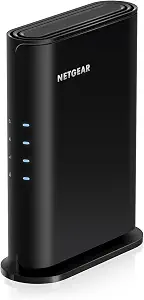
NETGEAR Nighthawk WiFi 6 Router R6700AX
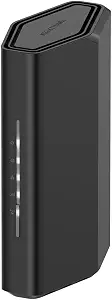
NETGEAR Nighthawk WiFi 7 Router RS90
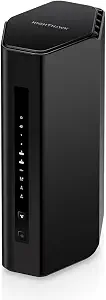
NETGEAR Nighthawk WiFi 7 Router RS300
Best Netgear Router Buying Guide — Black Friday Deals 2026
Choosing a Netgear router for Black Friday starts with the demands of your home, not the size of a sale banner. The models here span Wi-Fi 6 and Wi-Fi 7, with different stated coverage, device capacity, speed, and wired-port details. Those figures can help narrow the field, but they are not guarantees of what every room or device will experience. First consider how many devices you expect to connect, where the router will sit, and whether you rely on Ethernet. Then check that the exact model in a Black Friday offer matches the one you intended to buy. This guide explains the differences and the practical questions worth settling before checkout.
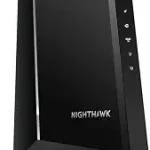
NETGEAR Nighthawk WiFi 6 Router R6700AX
Best Budget is the editorial label for the NETGEAR Nighthawk WiFi 6 Router R6700AX, based on its stated Wi-Fi 6 features and its more contained coverage and device-capacity figures within this selection. It delivers speeds up to 1.8 Gbps across 2.4 GHz and 5 GHz bands, covers up to 1,500 sq. ft., and is specified for up to 20 connected devices. Those details make it worth considering when a home’s needs fit the stated capacity. The label does not mean that a Black Friday offer is necessarily inexpensive; compare the actual offer and model before deciding.
The R6700AX includes four 1 Gig Ethernet LAN ports and a separate 1 Gig WAN port for connecting to a modem or gateway. Its compatibility information says it pairs with an existing modem or gateway via Ethernet, so shoppers can check their current setup against that requirement. The wired ports may be useful for devices you prefer to connect directly, while the Wi-Fi specifications describe its wireless generation and stated speed. Think about whether these particular connections suit the equipment you plan to use rather than relying on the product name alone.
This router’s setup information specifies guided setup through the free Nighthawk app on iOS or Android, and its listed wireless security is WPA3 encryption. Those are concrete details to weigh alongside the coverage and device figures. During Black Friday shopping, confirm that the listing is for the R6700AX and compare the exact variant and offer details; the seasonal label itself does not establish a discount or suitability. For a shopper whose intended use aligns with the listed Wi-Fi 6, coverage, and connection options, this model is a focused option to evaluate.
Key specs
| Wi-Fi speed | WiFi 6 delivers speeds up to 1.8 Gbps across 2.4 GHz and 5 GHz bands. |
| Coverage | Covers up to 1,500 sq. ft. |
| Connected devices | for up to 20 connected devices. |
| Ethernet LAN ports | Four 1 Gig Ethernet LAN ports |
| WAN port | A separate 1 Gig WAN port connects to your modem or gateway. |
| Setup | Download the free Nighthawk app on iOS or Android for guided setup. |
| Wireless security | WPA3 encryption |
| Modem compatibility | Pairs with your existing modem or gateway via ethernet. |
NETGEAR Nighthawk WiFi 7 Router RS90
Best Overall is the editorial choice for the NETGEAR Nighthawk WiFi 7 Router RS90 because its stated combination covers several common planning needs without pushing the conversation toward a single niche. It offers Wi-Fi 7, speeds up to 3.6 Gbps across 2.4 GHz and 5 GHz bands, coverage up to 2,000 sq. ft., and support for up to 50 devices. That mix may suit a household balancing everyday browsing, streaming, and connected equipment, provided its stated coverage and device capacity fit the home. These figures describe the product, not a promise of identical results in every layout.
For a Black Friday shortlist, consider whether the RS90’s feature set addresses a current need rather than buying a newer Wi-Fi generation just because it appears in a promotion. The 2.5 Gig WAN port is a specific connection detail to check against your internet equipment and service setup. The router also has four 1 Gig Ethernet LAN ports, which can matter if you want wired connections for devices such as a desktop or a television. The listed LAN ports are Gigabit; do not assume that the WAN port makes every wired connection operate at the same speed.
NETGEAR lists guided setup through the free Nighthawk app on iOS or Android. That gives shoppers a stated setup path to consider, though it does not establish how long setup will take in a particular home. If this model is your Black Friday pick, verify that the offer identifies the RS90 rather than another Nighthawk router, and look at the complete product details before comparing offers. Best Overall is a category recommendation among the products in this guide, not a claim that the RS90 is the right choice for every household.
Key specs
| WiFi speed | Up to 3.6 Gbps across 2.4 GHz and 5 GHz bands |
| Coverage | up to 2,000 sq. ft. of coverage |
| Device capacity | for up to 50 devices |
| WAN port | 2.5 Gig WAN port |
| LAN ports | Four 1 Gig Ethernet LAN ports |
| Setup | Download the free Nighthawk app on iOS or Android for guided setup. |
NETGEAR Nighthawk WiFi 7 Router RS300
Check Price on Amazon
Best for many connected devices is the editorial label for the NETGEAR Nighthawk WiFi 7 Router RS300. Its stated capacity is up to 100 devices, and its coverage is up to 2,500 sq. ft. Those figures give households with a large roster of connected equipment a useful starting point for comparison, although they do not guarantee identical coverage or results in every home. The RS300 is a tri-band Wi-Fi 7 router with a stated data transfer rate of 9.3 gigabits_per_second. Consider those details in relation to your actual devices and needs rather than treating a specification as a promise of a particular experience.
The Ethernet configuration is another reason to look closely at this model: it lists 2× 2.5G + 2× Gigabit Ports. If you use wired equipment, count the connections you want to make and compare them with that stated arrangement. The product also specifies MU-MIMO and OFDMA, plus WPA3 security. These are listed features to include in your decision, not evidence by themselves of how a particular network will perform. As with any router, the details that matter most depend on the devices and setup you intend to connect.
The RS300 can be a Black Friday candidate when your priority is its stated device capacity, tri-band design, or Ethernet-port configuration. Before purchasing, check that the offer names the RS300 and that its displayed specifications correspond to this model. A seasonal offer does not establish that this router is the right fit, nor does the Best for many connected devices label represent a test or market-wide award. It is an editorial distinction among the products in this guide, grounded in the RS300’s listed device capacity. Match that feature to your household’s needs before comparing the offer.
Key specs
| Wi-Fi generation | Wi-Fi 7 |
| Frequency bands | Tri-Band |
| Data transfer rate | 9.3 gigabits_per_second |
| Coverage | up to 2,500 sq. ft. |
| Device capacity | up to 100 devices |
| Ethernet ports | 2× 2.5G + 2× Gigabit Ports |
| Wireless features | MU-MIMO and OFDMA |
| Security protocol | WPA3 |
Plan around the rooms and devices that matter most
Coverage figures are useful for narrowing a shortlist, but treat them as planning references rather than a map of guaranteed signal in your home. The R6700AX is listed for up to 1,500 sq. ft., the RS90 for up to 2,000 sq. ft., and the RS300 for up to 2,500 sq. ft. Your layout, router placement, and connected equipment are practical considerations that can affect what you experience; the provided figures alone cannot settle how well a signal reaches a particular room. Think about where you need a dependable connection and how you use those spaces before choosing.
Device capacity is a separate consideration. The R6700AX is specified for up to 20 connected devices, the RS90 for up to 50, and the RS300 for up to 100. Count the devices you expect to use, including equipment that may connect infrequently, and consider whether that total is likely to change. A higher stated capacity is not automatically valuable if it does not match your needs, while a smaller stated capacity deserves attention if many devices share the network. When comparing Black Friday offers, use these figures to evaluate product fit, not to infer a sale’s value.
Choose a Wi-Fi description that answers your real question
The R6700AX is a Wi-Fi 6 model with speeds up to 1.8 Gbps across 2.4 GHz and 5 GHz bands. The RS90 is Wi-Fi 7, with speeds up to 3.6 Gbps across those same named bands. The RS300 is also Wi-Fi 7 and is described as tri-band, with a data transfer rate of 9.3 gigabits_per_second. These specifications are presented in different forms, so avoid treating them as direct promises of the speed a particular device will receive. Your devices and internet plan are part of the decision too.
A sensible Black Friday comparison begins by asking which stated feature is relevant to your setup. If you are weighing Wi-Fi generations, check the devices you intend to connect and the product’s exact description. If tri-band is a feature you are seeking, the RS300 is the model in this selection identified as tri-band. If you mainly want a router whose stated capacity and coverage fit your plans, those specifications may be more useful to your shortlist than a headline speed. Keep the product’s full name visible as you compare offers so a different model does not become a substitute by mistake.
Account for the cables and equipment already in your home
Start with the devices you may want to connect by Ethernet. The R6700AX lists four 1 Gig Ethernet LAN ports and a separate 1 Gig WAN port. The RS90 lists four 1 Gig Ethernet LAN ports and a 2.5 Gig WAN port. The RS300 lists 2× 2.5G + 2× Gigabit Ports. These are distinct configurations; compare them with the wired connections you actually plan to use rather than assuming that the models have interchangeable ports.
The R6700AX’s details say it pairs with an existing modem or gateway via Ethernet and that its separate WAN port connects to a modem or gateway. For the other routers, confirm the connection requirements in the exact product information before purchasing; the facts here do not specify a compatibility statement for them. This check is particularly worthwhile during Black Friday, when shoppers may be moving quickly between product pages. Make sure the model, port arrangement, and connection details you need match the offer you are considering.
Let setup and security details inform the shortlist
Setup information is one practical way to compare what the product descriptions confirm. Both the R6700AX and RS90 list guided setup through the free Nighthawk app on iOS or Android. If you prefer an app-based setup path, that is a specific detail to note. It does not establish how easy setup will be for your household, and the supplied details do not give setup instructions for the RS300, so check its listing if that matters to your decision.
The R6700AX specifies WPA3 encryption, and the RS300 specifies WPA3. Do not assume that the same security detail applies to the RS90 based on this guide; it is not included in the provided specifications. Instead, confirm the information for the exact model you plan to buy. On Black Friday, it can be tempting to focus only on the displayed offer, but a quick review of stated setup and security details helps keep the purchase grounded in your priorities. These features are decision points, not a complete assessment of network security.
Compare the offer without losing sight of the model
Black Friday can put several similar product names in front of a shopper at once. Keep the model number with your notes: R6700AX, RS90, or RS300. Then check that the exact offer identifies that model and that its listed specifications match the product you intend to compare. A Nighthawk name by itself does not tell you which Wi-Fi generation, capacity, coverage, or port configuration is included. Do not assume a seasonal label means a discount is active or that one offer is better value.
Make a short list of the features you actually need before reviewing offers: perhaps an Ethernet layout, a stated device capacity, an app-based setup path, or a particular Wi-Fi description. Next, compare the information presented for the exact model and variant. If a detail that matters to you is not stated, seek confirmation rather than filling the gap with an assumption. This approach makes Black Friday shopping more useful: you can evaluate the offer on its own terms while keeping product fit, rather than urgency, at the center of the decision.
Make your Black Friday choice
The right Netgear router depends on what you need it to connect, where you need coverage, and which wired or setup details matter in your home. The R6700AX, RS90, and RS300 each offer a different set of stated specifications, so let those details guide your shortlist rather than treating any editorial label as a universal verdict. When Black Friday offers appear, verify the exact model and compare the complete offer without assuming a promotion or a particular result. A careful match between your requirements and the product listing is more useful than choosing by season or headline alone.