Best Router Buying Guide — Black Friday Deals 2026
A router choice should start with the connection and devices you actually need to serve, not the biggest number printed on a box. These three TP-Link options range from an AC1200 dual-band model to a Wi-Fi 7 router with multi-gigabit ports, so they suit different priorities. Black Friday can be a useful moment to compare them, but a lower displayed price does not make every model the right fit. Check the exact model and variant, then weigh its wireless details, coverage information and wired ports against your home setup. Also plan for a separate modem: the listed routers require one.
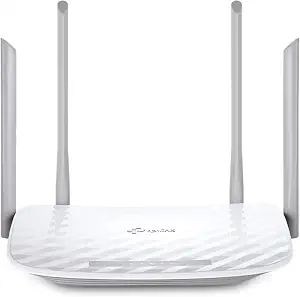
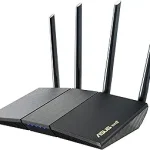
TP-Link AC1200 WiFi Router Dual Band Wireless Internet Router (Archer A54)
TP-Link AC1200 WiFi Router Dual Band Wireless Internet Router (Archer A54) (ASIN B09G5Y1HWZ)
The Archer A54 is the Best Budget choice in this group for shoppers whose priority is a straightforward dual-band router with specified entry-level wired ports. Its listed wireless speeds are up to 867 Mbps on 5 GHz and up to 300 Mbps on 2.4 GHz. Treat those as maximum figures, not a forecast of the speed a particular room, device or internet plan will deliver. The model lists four external antennas and coverage up to 1,000 sq. ft.; use that figure as a planning reference and consider the layout between the router and the places you use Wi-Fi. Black Friday comparisons are more useful when you check this exact model and its features, rather than choosing only by the apparent size of a discount.
The wired details deserve a close look. This router has four 10/100 Mbps Fast Ethernet ports. If you expect to connect equipment by cable, count the connections you need and decide whether those specified port speeds fit your use. The listing also says the A54 supports AP Mode, which can transform a wired connection into a wireless network. It includes support for IGMP Proxy/Snooping, Bridge and Tag VLAN to optimize IPTV streaming. Those are distinct reasons to consider it if access point use or IPTV support is relevant to your setup; they do not establish compatibility with every service or device.
The TP-Link Tether app is listed for network management, giving app-based management a place in the comparison alongside wireless and wired specifications. Ask whether the listed features align with what you plan to do, rather than assuming a budget label means fewer setup decisions. Every Wi-Fi router here requires a separate modem, so include that equipment in your planning. For Black Friday, compare the exact Archer A54 listing and variant against your needs, especially if wired devices are important. Best Budget is an editorial designation among these featured routers, not a promise of a particular sale price, savings or market-wide value.
Key specs
Wi-Fi speeds
5 GHz speeds up to 867 Mbps and 2.4 GHz speeds up to 300 Mbps
Coverage
Covers up to 1,000 sq. ft. with four external antennas
Ethernet ports
4 x 10/100 Mbps Fast Ethernet Ports
Access point mode
Supports AP Mode to transform your wired connection into wireless network
IPTV support
Supports IGMP Proxy/Snooping, Bridge and Tag VLAN to optimize IPTV streaming
Network management
Easy network management at your fingertips with the TP-Link Tether app.
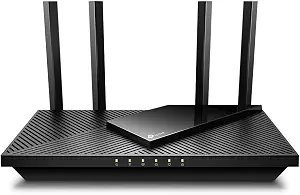
The Archer AX21 V5 earns the Best Overall label here as a considered middle choice: it pairs Wi-Fi 6 support with dual-band bandwidth listed at 1.8 Gbps total. The stated maximums are up to 1200 Mbps on 5 GHz and up to 574 Mbps on 2.4 GHz. Those figures describe the router’s wireless capacity, not a promise that an internet plan or any particular device will reach those speeds. For a household deciding between an older dual-band option and a newer Wi-Fi 7 model, its listed 802.11ax support makes it a practical model to compare. Black Friday shoppers can use that balance as a starting point, rather than assuming a label guarantees the best fit for every home.
The product also lists 802.11ac, 802.11ax, 802.11b, 802.11g and 802.11n standards, four antennas, and OFDMA technology for device connectivity. Those details may matter if your decision includes a mix of devices with different Wi-Fi standards or several devices sharing the network. The product information does not specify a device limit, so don’t treat the OFDMA mention as a guarantee about how many devices will feel fast at once. Instead, compare the listed capabilities with the devices and routines you want to support. During Black Friday, check that the listing is for Archer AX21 V5 rather than relying on a similar-looking product title.
This model also supports Open VPN Server and PPTP VPN Server. That can make it worth considering if router-based VPN server support is part of your checklist; it is a specific listed feature, not a claim about a VPN service being included. Its dimensions are 10.28″L x 5.3″W x 1.61″H, useful information when choosing a place for the router. Before buying, think through where its connection and power will be, and whether the router needs to sit near other equipment. The separate-modem requirement still applies. Best Overall is an editorial pick among these three options, not a test result or a claim that it suits every budget or network.
Key specs
Wi-Fi standards
802.11ac, 802.11ax, 802.11b, 802.11g, 802.11n
Dual-band bandwidth
1.8 Gbps total bandwidth (up to 1200 Mbps on 5 GHz and up to 574 Mbps on 2.4 GHz)
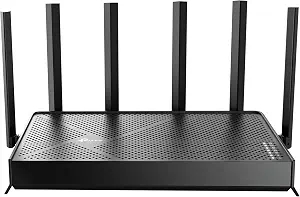
The Archer BE400 is the Best for Wi-Fi 7 and Multi-Gigabit Ports option for shoppers who specifically want to compare those listed capabilities. Its dual-band wireless figures are up to 5764 Mbps on 5 GHz and up to 688 Mbps on 2.4 GHz. The product also lists coverage up to 2,400 sq. ft. and support for up to 90 devices at a time. These are stated maximums, not a guarantee of performance throughout a particular home. Consider how your rooms are arranged and whether your devices or internet plan can make use of the capabilities you are shopping for. Black Friday is a reason to inspect the exact BE400 offer, not to assume that a Wi-Fi 7 label alone settles the decision.
Its port arrangement is a central point of difference for shoppers planning wired connections: one 2.5 Gbps WAN/LAN port, one 2.5 Gbps LAN port and three 1 Gbps LAN ports. Map those ports to the equipment and internet connection you expect to attach, and decide whether the layout suits your setup. The product says the Archer BE400 can expand into a seamless mesh network by connecting to an EasyMesh-compatible router or range extender. It is not compatible with mesh WiFi systems like Deco. Check that qualification carefully before treating it as an option for expanding an existing network.
Setup and control are also specified: the router requires a separate modem and can be set up and managed with the free Tether App. Those points help clarify what equipment and management approach the listing describes, but they do not answer every question about your current network. Before committing during Black Friday, verify that the model name is BE400 and review the port and mesh details against your own equipment. The label Best for Wi-Fi 7 and Multi-Gigabit Ports reflects its listed features among these three products; it is not a measured ranking or a claim that all shoppers need those capabilities.
Key specs
Wireless speeds
speeds up to 5764 Mbps (5 GHz) and 688 Mbps (2.4 GHz).
Coverage
up to 2,400 sq. ft. max coverage for up to 90 devices at a time.
Ethernet ports
1x 2.5 Gbps WAN/LAN port, 1x 2.5 Gbps LAN port and 3x 1 Gbps LAN ports
Mesh compatibility
Expand your network into a seamless mesh network by connecting the Archer BE400 to any EasyMesh-compatible router or range extender. Not compatible with mesh WiFi systems like Deco.
Setup requirement
All Wi-Fi routers require a separate modem.
Control
Quickly set up and manage your Archer BE400 with the free Tether App.
Start with the internet connection and existing equipment
Before comparing router features, identify the equipment that connects your home to the internet. Each of these Wi-Fi routers requires a separate modem, so a router purchase does not replace that requirement. If you already have a modem, check what role it plays in your setup and how the router will connect to it. If you are still choosing equipment, account for both pieces rather than treating the router as a complete internet connection.
Next, list the main ways you use the network: wireless devices, equipment you intend to connect by cable, and any specific needs such as access point mode, IPTV support or VPN server support. The A54 lists AP Mode and IPTV-related features; the AX21 V5 lists Open VPN Server and PPTP VPN Server; and the BE400 lists multi-gigabit ports and a qualified EasyMesh connection option. These features solve different shopping questions, so don’t compare them as if they were interchangeable.
Black Friday can bring attention to a displayed offer, but first make sure it matches the exact model you researched. A model name, version and stated feature set are better anchors than a broad category label. Then decide whether the offer is compelling for the features you will use and the separate equipment your setup requires. This keeps the purchase decision tied to your actual network rather than to an attractive headline.
Think about rooms, walls and where the router will sit
Coverage figures can help frame a choice, but they cannot describe every home’s layout. The Archer A54 lists coverage up to 1,000 sq. ft. with four external antennas, while the Archer BE400 lists up to 2,400 sq. ft. maximum coverage. Use those figures as points to investigate, not promises that every room will receive the same connection. The AX21 V5 listing gives four antennas but no coverage figure in the provided details, so avoid filling that gap with an assumption.
Sketch where people use wireless devices and where the router could reasonably sit. A router placed away from the rooms that matter may not meet your needs simply because its listed coverage sounds sufficient. Consider whether the product’s physical dimensions and the practical location of your modem, power and cables affect placement. The AX21 V5 dimensions are listed as 10.28″L x 5.3″W x 1.61″H; the other listed details do not provide dimensions.
When Black Friday comparisons put coverage figures side by side, retain their qualifications, including words such as “up to” and “maximum.” Think about the spaces your network needs to serve and whether you may want a future expansion path. The BE400’s EasyMesh compatibility is specifically with an EasyMesh-compatible router or range extender, and it is not compatible with mesh WiFi systems like Deco. Confirm that limitation against your existing equipment before treating mesh expansion as part of your plan.
Choose wireless capabilities for the devices you use
Wireless speed figures are most useful when read as product specifications, not as guaranteed everyday results. The A54 lists up to 867 Mbps on 5 GHz and up to 300 Mbps on 2.4 GHz. The AX21 V5 lists up to 1200 Mbps on 5 GHz and up to 574 Mbps on 2.4 GHz, with 1.8 Gbps total bandwidth. The BE400 lists up to 5764 Mbps on 5 GHz and up to 688 Mbps on 2.4 GHz. None of these figures alone predicts the speed you will experience on a particular device or internet plan.
Consider the standards and features that matter to your devices. The AX21 V5 lists 802.11ac, 802.11ax, 802.11b, 802.11g and 802.11n support, along with OFDMA technology for device connectivity. The BE400 is presented as a Wi-Fi 7 router. The A54’s product name identifies it as an AC1200 dual-band router. Match these details to your actual shopping priorities instead of assuming a newer or larger figure is automatically necessary.
Black Friday may make it tempting to jump straight to the highest listed speed. A more useful comparison asks whether the router’s stated wireless features match the devices and routines in your home, and whether another feature—such as wired ports or app management—matters more. A household with a specific VPN-server requirement may focus on the AX21 V5’s listed support; someone who wants a budget-oriented option may weigh the A54’s feature set differently. Let the use case guide the comparison.
Count cable connections before choosing a port layout
If you plan to connect devices by Ethernet, count the connections before buying. The A54 has four 10/100 Mbps Fast Ethernet ports. The BE400 lists one 2.5 Gbps WAN/LAN port, one 2.5 Gbps LAN port and three 1 Gbps LAN ports. These layouts are not the same, so identify which wired devices you expect to connect and what port arrangement your setup calls for. The provided AX21 V5 details do not specify its Ethernet ports; don’t assume a port count or speed based on another router.
For a simple planning exercise, write down the equipment you expect to wire and mark any connection that needs a particular port type. Also distinguish the port used for the internet connection from the ports intended for local devices; the BE400 listing explicitly describes one port as WAN/LAN. If wired connections are not important to you, avoid letting an impressive port specification outweigh the features you will use more often.
Black Friday listings can emphasize headline wireless figures, while the port details may be lower in the description. Read the exact model’s port information before comparing offers. This is especially useful when moving from an older setup or planning to connect several pieces of equipment. A port layout is a practical fit question, not a general measure of which router is best.
Separate useful extras from features you will not use
Additional features are valuable when they match a real requirement. The A54 lists AP Mode, support for IGMP Proxy/Snooping, Bridge and Tag VLAN to optimize IPTV streaming, and management through the TP-Link Tether app. The AX21 V5 lists Open VPN Server and PPTP VPN Server support. The BE400 lists Tether App setup and management as well as its qualified EasyMesh expansion option. Consider which of these details would change how you use your network; don’t treat a longer feature list as a reason by itself to spend more.
If app-based management matters to you, both the A54 and BE400 specifically mention the Tether App in their supplied details. If VPN server support is a priority, the AX21 V5 is the one here with that feature listed. If you already use mesh equipment, check the BE400’s stated EasyMesh compatibility and its explicit incompatibility with Deco systems. These distinctions make a shortlist more relevant, while still leaving questions about your particular service and equipment for you to verify.
When comparing Black Friday offers, use a small checklist: exact model, required modem, wireless needs, wired connections and any must-have extra. Confirm that the offer refers to the product variant you intend to buy, and judge the listed features against that checklist. This approach avoids inventing value from an unknown discount and helps distinguish a suitable offer from one that merely looks prominent.
Make your Black Friday choice
There is no single best router for every connection and household. The AX21 V5 is the editorial Best Overall pick here, the A54 is the Best Budget choice, and the BE400 is the option labeled Best for Wi-Fi 7 and Multi-Gigabit Ports. Each label describes a choice among these featured models, not a universal ranking. Before acting on a Black Friday offer, verify its exact model, review the specifications that matter to your devices and cables, and remember the separate-modem requirement. A careful fit check is more useful than chasing a headline number.