SAMSUNG 34″ ViewFinity S50GC Series Ultra-WQHD Monitor (ASIN B0C1KPXPM9)
Best Samsung Monitor Buying Guide — Black Friday Deals 2026
Choosing a Samsung monitor for Black Friday starts with matching the screen to the work or play you actually do—not chasing the biggest specification on a product page. This guide compares three distinct options: a curved QHD gaming display, a curved Full HD screen, and an Ultra-WQHD model with a 21:9 aspect ratio. Each has a different reason to make your shortlist, from a faster listed refresh rate to eye-comfort features or a wide workspace. Black Friday offers can change, so compare the exact model and configuration shown before deciding. The goal is to identify which listed features matter at your desk and which tradeoffs you are comfortable making.
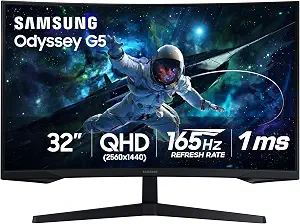
Samsung 32″ Odyssey (G55C) Series QHD 1000R Curved Gaming Monitor
Best Overall is an editorial pick among these three Samsung monitors, not a claim of measured superiority. The Odyssey G55C combines a 32-inch screen with 2560×1440 resolution, a 165 hertz refresh rate and a listed response time of 1 milliseconds. That mix makes it a strong starting point for someone who wants a gaming-oriented display with more detail than the Full HD option here, while still considering motion-related specifications. Its 1000R curved display is a defining part of the choice: consider whether you prefer a pronounced curve at your usual viewing position before adding it to a Black Friday shortlist.
The G55C also lists HDR10 and DisplayPort and HDMI connectivity. Those details help narrow the decision, but check the inputs and settings required by your own equipment rather than assuming the monitor suits every source. The resolution and screen size may also influence how you arrange windows or set up games; think through your typical viewing distance and desk space instead of choosing on screen size alone. A higher refresh-rate figure may matter to shoppers who prioritize that specification, while the response-time figure is another detail to weigh against personal priorities. Neither figure should be treated as a guarantee of a particular experience in every game or setup.
For Black Friday, verify that the listing is for the G55C model and compare the exact configuration being offered. Do not let a changing offer distract from the features that explain this pick: a large curved screen, QHD resolution, and its listed refresh and response figures. If you would rather have a flatter workspace or primarily want an expansive format for several work windows, consider the other picks instead. The Odyssey is the most natural choice in this group when gaming-related specifications and a pronounced curve are central to your decision; it is not automatically the right answer for every Samsung monitor shopper.
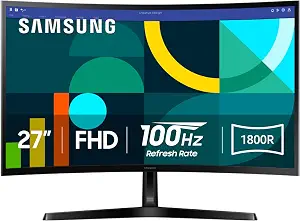
Best Budget is the editorial label for the Samsung Essential S3 S36GD in this guide; it describes its role among the listed options, not a verified price advantage. This 27-inch curved monitor has 1920 x 1080 pixels of resolution, a 100 hertz refresh rate and a listed response time of 4 milliseconds. The 1800R curve gives it a different screen shape from the Odyssey G55C, so consider which curvature feels appropriate for your desk and viewing habits. Its Full HD resolution is a straightforward choice for shoppers who do not need the wider or QHD formats featured elsewhere in this guide.
There are useful details beyond the basic screen format. The listed contrast ratio is 3,000:1, and eye-comfort features include Blue Light Filter and Flicker-Free. These are specifications to consider if you value those options; they do not guarantee a particular level of comfort for every person or situation. Connectivity is listed as D-Sub and HDMI, so compare those inputs with the ports available on the equipment you plan to connect. The product name identifies this as an Essential S3 curved computer monitor, but the right fit still depends on your own desk, source devices and preferred image format.
During Black Friday, compare the exact S36GD listing rather than relying on a category label or a thumbnail that may not show every detail. Check that the model and the listed configuration match what you intend to buy, then weigh its screen size, Full HD resolution, 100 hertz refresh rate and eye-comfort features against your needs. This pick can suit someone seeking a curved Samsung monitor with familiar Full HD resolution and a set of comfort-related features. If your priority is a more expansive workspace, the 34-inch ViewFinity is a different direction; if gaming-related refresh and response figures lead your decision, the Odyssey has different listed specifications.
Key specs
Screen size
27 inches
Resolution
1920 x 1080 pixels
Refresh rate
100 hertz
Contrast ratio
3,000:1
Response time
4 milliseconds
Connectivity
D-Sub, HDMI
Eye comfort features
Blue Light Filter, Flicker-Free
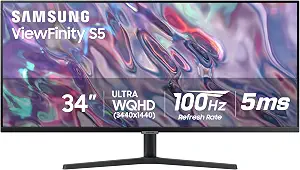
SAMSUNG 34″ ViewFinity S50GC Series Ultra-WQHD Monitor
SAMSUNG 34″ ViewFinity S50GC Series Ultra-WQHD Monitor (ASIN B0C1KPXPM9)
Best for Wide-Format Workspaces is the editorial label for the Samsung ViewFinity S50GC. Its 34-inch screen, 3440 x 1440 pixels and 21:9 aspect ratio give this model a wide-format identity within this group. Consider it if your work involves arranging windows side by side or you simply prefer an ultrawide layout, while keeping in mind that the practical fit depends on your desk and how you use applications. The stated format makes this a distinct alternative to the two curved monitors, rather than a universal upgrade for every workspace.
The S50GC lists a 100 hertz refresh rate, a 5 milliseconds response time, a matte screen finish, HDR10 and FreeSync. Its PBP feature is described as allowing input from 2 simultaneous sources at native resolution. That may be relevant if you have a use for viewing two sources together; check your intended sources and workflow before treating it as a deciding feature. The specification list provides useful comparison points, but it does not establish how a particular room, application or personal setup will look. Think about the wide aspect ratio first, then consider which of the other listed features matter to you.
For Black Friday, make sure the offer is specifically for the ViewFinity S50GC and compare its exact configuration with your intended setup. This monitor earns its place in the guide through its wide format and PBP capability, not through an assumption that every buyer needs an ultrawide screen. If your desk tasks benefit from a broad canvas, those features give you concrete reasons to investigate it. If a curved gaming screen or eye-comfort options are more important, the Odyssey G55C and Essential S3 offer different sets of listed features. Use your own workflow to decide whether the ViewFinity’s shape is worth prioritizing.
Key specs
Screen size
34 inches
Resolution
3440 x 1440 pixels
Aspect ratio
21:9
Refresh rate
100 hertz
Response time
5 milliseconds
Screen finish
Matte
Picture quality
HDR10
Adaptive sync
FreeSync
Multi-source viewing
With PBP, view input from 2 simultaneous sources at native resolution
Let your desk routine set the shortlist
Before browsing a Black Friday page, picture a normal session at your desk. Are you focused on games, switching among work windows, or using a simple screen for everyday computing? Those habits point toward different features in this group. The Odyssey G55C has a 32-inch curved display, QHD resolution and gaming-related refresh and response specifications. The ViewFinity S50GC centers on a 34-inch, 21:9 format and includes PBP for viewing two sources at once. The Essential S3 is a 27-inch curved Full HD option with Blue Light Filter and Flicker-Free features. These are distinct starting points, not proof that one model suits everyone.
Also account for the space and viewing position you already have. A wider screen can change how you arrange windows, while a curved display makes curvature part of the viewing experience. Consider where the monitor will sit, how far you tend to sit from it and whether you want room for other desk items. This is personal planning rather than a claim that one format is more comfortable. During Black Friday, keep your shortlist focused on the features that solve a real need. A headline offer is less useful if the monitor’s shape, resolution or inputs do not match your routine.
Decide how much screen detail and width you need
Resolution and aspect ratio affect the kind of screen layout you are choosing. The Essential S3 is listed at 1920 x 1080 pixels; the Odyssey G55C is 2560×1440; and the ViewFinity S50GC is 3440 x 1440 pixels with a 21:9 aspect ratio. Those figures identify different formats, but do not by themselves say which will look best for your content or preferred viewing distance. Think about whether you want a familiar Full HD format, the Odyssey’s QHD resolution, or the broader ViewFinity canvas before comparing other details.
A wide screen can be appealing for a workflow that uses several visible windows, while a more conventional format may better match a simpler desk setup. That is a use-case distinction, not a promise that any particular application will display in a specific way. Check the software and sources you use, and consider whether you would actually make use of the screen area. Black Friday is a useful time to compare alternatives, but avoid treating a larger screen or a larger resolution figure as automatically better. Pick the format that aligns with your tasks, available space and viewing preferences.
Put refresh and response figures in perspective
The listed refresh rates are 165 hertz for the Odyssey G55C and 100 hertz for both the Essential S3 and ViewFinity S50GC. Their listed response times are 1 milliseconds, 4 milliseconds and 5 milliseconds, respectively. These are useful specifications to compare if they are important to your decision, particularly when selecting a gaming-oriented display. They are not a substitute for considering your own equipment, settings or the content you view, and they do not guarantee a particular result in every situation.
If you are shopping for games, first decide how much weight you place on refresh and response figures, then compare them with the screen size, resolution and curvature you prefer. For other kinds of desk work, those figures may be less central than the ViewFinity’s wide format or the Essential S3’s eye-comfort features. Black Friday listings can make it tempting to focus on a single prominent number. Instead, look at the complete specification set and confirm that the model name is the one you meant to compare. A decision grounded in your priorities is more useful than chasing a number without a clear reason.
Match the connections and special features to your setup
Check the listed inputs against the devices you intend to connect. The Odyssey G55C lists DisplayPort and HDMI; the Essential S3 lists D-Sub and HDMI. The ViewFinity S50GC’s provided details include PBP, which allows input from 2 simultaneous sources at native resolution. These facts can help you decide which product details to investigate, but make the connection check against your own equipment rather than assuming a particular cable, adapter or device arrangement will work. If a specific connection or multi-source workflow matters, confirm the exact requirement before purchase.
The other special features may also help separate the models. HDR10 is listed for both the Odyssey and ViewFinity, while FreeSync is listed for the ViewFinity. The Essential S3 lists Blue Light Filter and Flicker-Free, and the ViewFinity has a matte screen finish. Treat these as selection criteria only when they matter to you; their presence does not establish a particular benefit in every room or for every person. When comparing Black Friday offers, keep this feature check beside your model comparison so a similar-looking product page does not pull attention away from the details you need.
Compare the exact Black Friday listing, not just the headline
A Black Friday offer is worth evaluating only after you know which model and configuration it covers. Check the full product name and model identifier: G55C, S36GD or S50GC. Then compare the listing’s details with the screen size, resolution and features that led you to consider that product. This guide does not claim that any particular offer is active or that a listed monitor will be discounted. Prices and offer terms can change, so judge the current listing itself instead of assuming a deal from the season or a product label.
Keep a short personal checklist: preferred screen format, must-have inputs, features you will actually use and any specification you are unwilling to compromise on. Review the offer against that list before deciding, and check that the selected item matches the model you researched. If the listing leaves an important point unclear, seek clarification through the product page before committing. This approach keeps the comparison practical without relying on unsupported savings claims. Black Friday can bring many competing messages, but the best fit is the Samsung monitor whose confirmed details match your intended use and setup.
Make your Black Friday choice
These three Samsung monitors serve different priorities: the Odyssey G55C combines a curved QHD screen with the highest listed refresh rate in this group; the Essential S3 offers a curved Full HD format and eye-comfort features; and the ViewFinity S50GC is built around a wide 21:9 workspace with PBP. Those distinctions provide a more useful starting point than a broad claim that one is best for everyone. As Black Friday approaches, compare the exact model and listing with your own desk needs, connection requirements and preferred screen format. Choose the features you will use, verify the offer details, and let that match—not the seasonal headline—guide your decision.