Nikon Z 8 Buying Guide — Black Friday Deals 2026
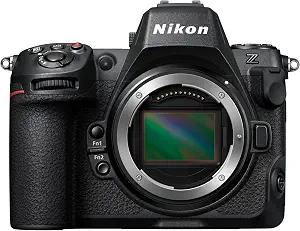
The Nikon Z 8 brings high-resolution still capture, subject-aware autofocus, fast continuous-shooting options and advanced internal video recording into one camera. The useful question for a Black Friday purchase is not simply whether a listing looks attractive; it is whether this particular mix of image formats, shooting rates and video modes fits the work you plan to do. Start with the scenes you want to capture and the files you need afterward, then compare the exact offer and camera variant presented at checkout. This guide focuses on what the listed specifications establish—and what you should decide for yourself.
The Nikon Z 8 is a strong candidate for a photographer or hybrid creator whose plans call for both detailed stills and substantial video options. Its 45.7MP stacked CMOS sensor and EXPEED 7 processing engine give you a high-resolution starting point for still images. That specification may matter if you want to retain fine image detail in your files, but the right choice still depends on your subjects, output needs and preferred editing process. For Black Friday, consider whether you will make regular use of that resolution and the camera’s recording choices, rather than treating a broad feature list as a reason by itself to buy.
The autofocus system combines subject detection with 3D tracking and detects focus as low as -9 EV. Those details are relevant when choosing a camera for subjects that move through the frame or when you expect to work in dim conditions. They describe the available focus features, not a guarantee that every subject or scene will be handled the way you prefer; consider the kinds of subjects you photograph and what you expect from tracking. For action, the listed continuous-shooting options are 20, 30, 60 and 120 fps. The available choices give you different rates to consider when planning a sequence, but your own subject and workflow should guide which option matters.
For video, the Z 8 offers internal 8K/60p and 4K/120p recording, as well as internal 12-bit N-RAW and ProRes RAW recording. These options may appeal if high-resolution capture, slow-motion possibilities or RAW video are part of your intended work. Before a Black Friday purchase, think through how you expect to manage and edit the resulting footage; the specifications identify recording modes, but do not establish which one suits your particular production. Still-image choices include RAW 14-bit, High Efficiency RAW, 10-bit HEIF and JPEG 8-bit, so there are several file types to weigh against your needs for editing and delivery. The Best for flexible still and video formats label reflects these documented choices, not a claim of measured superiority.
Key specs
| Sensor and processor | 45.7MP stacked CMOS sensor and EXPEED 7 processing engine. |
| Autofocus | detects focus as low as -9 EV, combines subject detection and 3D tracking. |
| Video | Internal 8K/60p and 4K/120p video. |
| RAW video | Internal 12-bit N-RAW and ProRes RAW recording. |
| Still image formats | RAW 14-bit, High Efficiency RAW, 10-bit HEIF and JPEG 8-bit. |
| Continuous shooting | 20, 30, 60 and 120 fps shooting options. |
Start with the finished images you need
The 45.7MP stacked CMOS sensor is the clearest place to begin if image detail is a priority. Ask what you do with photographs after capture: do you expect to keep substantial detail in your still files, or are other parts of your workflow more important? The sensor specification establishes the camera’s resolution, while your intended output determines how valuable that resolution is to you. EXPEED 7 processing is also listed, but the provided details do not quantify how it changes a particular workflow, so keep your decision anchored to the features you can verify.
The still-image formats make the choice more specific. RAW 14-bit, High Efficiency RAW, 10-bit HEIF and JPEG 8-bit are listed options, giving you different formats to consider for capture and subsequent use. Think about whether you want a RAW file for your editing process, a High Efficiency RAW option, HEIF, or JPEG. The specifications do not define file size or the suitability of each format for a particular destination, so avoid assuming those details. During Black Friday comparisons, check that the listing is for the Nikon Z 8 and weigh the stated formats against the files you actually expect to make.
Choose autofocus features around your subjects
Subject detection and 3D tracking are the named parts of the Z 8 autofocus system. They are useful details to consider if you want focus to follow a subject as it moves within the frame. The camera is also specified to detect focus as low as -9 EV, a detail that may be relevant when your planned scenes include dim conditions. These facts describe the system’s listed capabilities; they do not tell you how it will respond to every subject, movement pattern or composition.
Make a short list of the situations you photograph most often before deciding whether these focus features match your priorities. A person moving through a scene, for example, presents a different practical question from a stationary subject, but your preferred focus behavior remains personal. Black Friday should not turn that decision into a rush: compare the exact camera variant and offer, and look for the named autofocus details in the product information. Do not assume a listing includes anything beyond what it explicitly identifies.
Set a purpose for the continuous-shooting options
The Z 8 lists continuous-shooting options of 20, 30, 60 and 120 fps. Rather than treating the highest listed rate as automatically best, connect the choice to the moments you intend to capture. You might care about having a selection of frames from a brief action sequence, or you may rarely need rapid continuous shooting. The specifications confirm the available rates, but do not state how long a sequence can continue or describe other conditions, so those points should not be inferred.
Consider how you will review and choose images after a sequence, too. A shooting option is only useful to your plans if it fits both the moment and the way you handle the resulting photographs. For a Black Friday purchase, note the listed rates that matter to you and check that the product being compared is the Nikon Z 8, rather than relying on a broad camera-family description. This keeps a decision about an actual feature separate from assumptions about how it will perform in your particular situation.
Black Friday video choices: match capture to the project
Internal 8K/60p and 4K/120p video are the Z 8’s listed video modes. They give video-minded shoppers concrete options to compare with the kind of footage they plan to make. Decide whether 8K/60p or 4K/120p is relevant to your intended project instead of choosing a mode simply because its specification sounds advanced. The provided facts identify these recording options; they do not set out other recording limits or explain which mode is preferable for a particular finished video.
The internal recording detail matters when you are mapping out a capture workflow. Before Black Friday, write down the video mode you expect to use and compare it with the exact listing. If the offer description does not clearly identify the Nikon Z 8 or the relevant configuration, pause and verify what is being offered before relying on the headline. That is a practical way to compare an offer without assuming a promotion is active or that two listings describe the same variant.
Black Friday RAW decisions: plan for the files afterward
For video, the camera lists internal 12-bit N-RAW and ProRes RAW recording. These formats may be meaningful if RAW video is part of your planned capture and editing process. For stills, the listed choices include RAW 14-bit alongside High Efficiency RAW, 10-bit HEIF and JPEG 8-bit. Think separately about still and video files: the fact that both have RAW options does not make their recording formats interchangeable. Choose based on the work you intend to do with each type of file.
If you are comparing Black Friday offers, distinguish verified product details from assumptions about what a seller or bundle includes. Check the product name and the exact variant, then confirm the features that matter to your workflow in the listing. The facts here do not establish a sale price, discount, stock status or included extras, so compare those details only when they are explicitly shown. A clear checklist helps you avoid letting a temporary-looking offer distract from whether the Z 8’s formats and recording modes suit your plans.
Make your Black Friday choice
The Nikon Z 8 makes the most sense to consider when its high-resolution still capture, autofocus features, continuous-shooting rates and internal video formats align with the pictures and footage you intend to create. For Black Friday, compare the exact offer and variant against that personal checklist, and verify the listed features before checkout. Let your planned use—not an assumed discount or the longest specification list—decide whether this camera is the right fit.