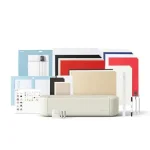
An embroidery machine deal is only useful if the machine’s format and capabilities fit the projects you actually plan to make. For Black Friday, compare the exact model and variant in the offer, then weigh the embroidery area, built-in designs, file-transfer options, and whether you also need ordinary sewing functions. A lower listed price is not, by itself, a reason to choose a machine that does not suit your workflow. This guide covers a sewing-and-embroidery combination, an embroidery-only Brother, and a multi-needle Smartstitch. Their feature sets serve different needs, so check the listing details carefully before deciding whether a Black Friday offer is a match.
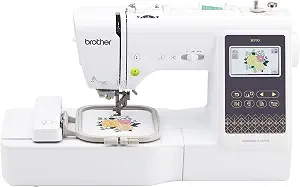
Brother SE700 Sewing and Embroidery Machine (ASIN B0B8DYP1RN)
Best Budget is an editorial designation for this selection, not a claim about a verified price or a market-wide award. The Brother SE700 combines sewing and embroidery, making it worth considering if you want both functions in one machine rather than an embroidery-only model. Its embroidery field is 4″ x 4″, with 135 built-in designs and 10 embroidery lettering fonts. For projects that fit that field, the built-in choices give you options to start from without first transferring a design.
For sewing, it has 103 built-in sewing stitches, including 10 styles of one step auto-size buttonholes, and comes with 8 sewing feet. A 3.7-inch LCD color touchscreen provides an on-machine display. The machine can receive embroidery files from a PC through the free downloadable Design Database Transfer software. That transfer route may matter if you expect to work with files beyond the built-in designs; check the software and file details that apply to your intended workflow rather than assuming every design file will be usable.
The compact-sounding 4″ x 4″ field is an important planning point, not a promise that every project will fit. Think about the intended placement and design dimensions before making this your choice. If you chiefly want a combined sewing and embroidery machine and expect to work within that embroidery field, the SE700 has a useful mix of listed functions. If your priority is a larger embroidery area, compare that requirement against the other featured models instead of letting a Black Friday offer decide for you.
When comparing the exact Black Friday listing, confirm that it is the SE700 and review what the offer actually includes; the supplied product details identify 8 sewing feet but do not establish any additional bundle contents. Consider whether the sewing stitches and buttonhole options matter to your routine as much as embroidery. This is the pick for shoppers who value the two functions together, not a recommendation based on an unverified discount. If your projects are embroidery-only, compare the PE900’s dedicated-machine features before choosing.
Key specs
Embroidery designs
135 built-in designs and 10 embroidery lettering fonts
Sewing stitches
103 built-in sewing stitches including 10 styles of one step auto-size buttonholes
Embroidery field
4″ x 4″ embroidery field
Touchscreen
3.7-inch LCD color touchscreen
Wireless transfer
Transmit embroidery files from your PC to your embroidery sewing machine via the free downloadable software Design Database Transfer(1)
Included feet
8 sewing feet
Brother PE900 Wireless Embroidery Machine with WLAN
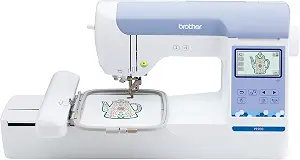
Brother PE900 Wireless Embroidery Machine with WLAN (ASIN B0B8337QHR)
Best Overall is the editorial label for the Brother PE900 among these featured options; it does not represent a test result or a market-wide ranking. This is an embroidery-only machine, not a traditional sewing machine. Its maximum embroidery area is 5” x 7”, and it includes 193 built-in embroidery designs. Those details make it a candidate for shoppers whose main goal is embroidery and whose planned designs need to fit within that stated area. It is not the right choice if you require the machine itself to perform traditional sewing.
The PE900 has 13 lettering fonts: 9 English, 3 Japanese, and 1 Cyrillic. Its 3.7-inch LCD display supports the machine’s on-device workflow. For transferring embroidery files from a PC, the listed options are the free downloadable Design Database Transfer software or the built-in USB port. Having both stated transfer routes gives shoppers a concrete choice to consider, but check that your own file-preparation process fits the available method before making a purchase.
A mobile app adds another listed route for finding or creating designs: it provides access to 50 free embroidery designs, lets you make custom embroidery patterns by drawing on a mobile device, and can transfer patterns from its collection to the PE900 wirelessly. Treat those as specific app features, not as a guarantee that every pattern or device workflow will work for every project. If you expect to rely on the app, review the app details and the exact listing before you buy.
For Black Friday, this is a strong place to start if you want a dedicated embroidery machine, appreciate built-in design and lettering choices, and can work within the stated embroidery area. It makes less sense when conventional sewing is a must-have, since the product is explicitly embroidery-only. Compare the exact model and any stated bundle contents rather than assuming an offer includes extras. The Black Friday decision should come down to fit with your projects and transfer preferences, not an assumed promotion or a headline price alone.
Key specs
Machine type
The PE900 is an embroidery-only machine and does not function as a traditional sewing machine
Embroidery area
5” x 7” maximum embroidery area
Wireless transfer
Transmit embroidery files from your PC to your embroidery machine via the free downloadable software Design Database Transfer(1), or connect via the built-in USB port
Built-in designs
193 built-in embroidery designs
Lettering fonts
13 lettering fonts (9 English, 3 Japanese, and 1 Cyrillic)
Display
3.7-inch LCD display
Mobile app
Access 50 free embroidery designs, make custom embroidery patterns by drawing on your mobile device, or download patterns from the collection and transfer them to your PE900 wirelessly
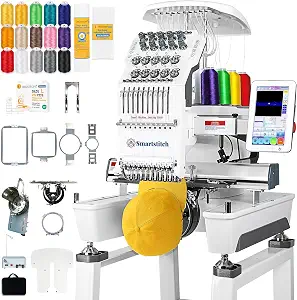
Best for Larger Embroidery Projects is the editorial label for the Smartstitch S-1001, grounded in its listed 9.5″x14.2″ embroidery area. That label is a way to identify a potentially relevant feature, not a measured comparison or guarantee that a particular project will fit. Check the actual design dimensions and placement needs before choosing it. The machine also has 10 needles and a 7″ touch screen, details to weigh alongside the space your projects require.
The listed maximum speed is 1200SPM. Automatic functions include auto thread trimming and auto color changing, and the machine has thread break detection. These features may be relevant when comparing how the listed machine functions align with your workflow, but they do not establish a particular production result. The product supports transferring DST/DSB files from a computer to the machine with USB/WiFi, so confirm that your designs are available in a compatible format before relying on that transfer path.
The provided material list says it can stitch on denim, canvas, leather, vinyl, caps, shoes, and bags. That range may be useful when you are considering projects beyond flat fabric, but it is not a guarantee for every item or setup. Review the exact project requirements and listing information rather than extrapolating from the material names. The broader embroidery area and multi-needle setup are central points to consider, while the file formats and transfer method deserve equal attention if you already have designs prepared.
For Black Friday, compare the precise S-1001 listing and the configuration described in the offer; the supplied facts do not establish a particular bundle, price, or promotion. This model may suit shoppers who need its stated embroidery area and are interested in the listed materials and automatic functions. It is a more specialized choice to evaluate against your space, files, and project plans, rather than a default pick for every home embroidery task. Make sure the offer matches the machine you intend to buy.
Key specs
Needles
10 Needles
Max speed
1200SPM Max Speed
Touch screen
7″ Touch Screen
Embroidery area
9.5″x14.2″ Embroidery Area
Automatic functions
Auto thread trimming; Auto color changing
Thread detection
Thread break detection
Compatible file transfer
DST/DSB files from your computer to the machine with the USB/WiFi
Materials
can stitch on denim, canvas, leather, vinyl, caps, shoes, bags
How to Compare Black Friday Embroidery Machine Offers
Start by identifying the exact model in each Black Friday offer. A similar-looking listing or a different variant may not have the same features, and the available information here does not establish that every seller’s offer includes the same accessories or configuration. Read the listing details and compare them with the machine’s intended role: combined sewing and embroidery, embroidery-only, or a model with a larger stated embroidery area and multiple needles. This basic match matters more than a promotional headline.
Next, compare the features that directly affect your projects. Consider the maximum or stated embroidery area, the designs and lettering built in, and how you would transfer outside files. Think through what you plan to embroider, where the design needs to sit, and whether your current files fit a listed transfer method. For the SE700, the stated transfer method uses Design Database Transfer software; the PE900 lists that software or USB, plus its app features; the Smartstitch lists DST/DSB transfer using USB/WiFi. Do not assume these routes are interchangeable.
Before treating a Black Friday price as a deal, read the full offer and verify the product identity and any included items stated there. No sale price, discount, availability, or bundle is established by this guide. Keep a short list of must-haves and compare each exact offer against it. If a feature is not described in the listing you are considering, seek clarification rather than assuming it is included. That approach helps you distinguish an offer that fits from one that only looks attractive at a glance.
Choose the Embroidery Area Around Your Actual Designs
The embroidery area is one of the most practical filters because it places a boundary on the design area described for a machine. The SE700 has a 4″ x 4″ embroidery field, the PE900 has a 5” x 7” maximum embroidery area, and the Smartstitch lists a 9.5″x14.2″ embroidery area. These are the specifications provided for these models; they are not a promise that a design will fit without checking its dimensions and intended placement. Compare the size you need with the exact wording for the machine under consideration.
Think about the items you expect to decorate and where the embroidery should appear. A design intended for a small area may lead you to prioritize other features, while a project requiring more room makes the stated field especially relevant. For the Smartstitch, the supplied material list names caps, shoes, and bags among other materials, but that information alone does not confirm how a particular item should be positioned or what setup it requires. Check project-specific requirements instead of assuming the area settles every practical question.
Black Friday can make it tempting to focus on the apparent deal first. Reverse that order: write down the dimensions of the designs you care about, check their placement needs, and then decide which listed field is appropriate. If you are unsure whether a design fits, do not assume that a larger-sounding offer resolves the issue; verify the design and machine details. The best choice is the one whose stated area aligns with the work you actually want to do.
Decide Whether You Need Sewing as Well as Embroidery
A key distinction among these machines is whether traditional sewing is part of the product’s stated function. The Brother SE700 is a sewing and embroidery machine, with 103 built-in sewing stitches and 10 styles of one step auto-size buttonholes. It also includes 8 sewing feet. Those listed details are relevant if you want sewing functions alongside embroidery, but consider whether they address the kinds of sewing tasks you plan to do rather than treating a stitch count as a complete measure of fit.
The PE900 is explicitly embroidery-only and does not function as a traditional sewing machine. That clarity makes it easier to rule out if sewing is essential, or to keep on your shortlist if your purchase is specifically for embroidery. The Smartstitch facts provided describe embroidery features and do not establish a sewing function, so do not infer one from the available details. Check the exact product listing when sewing capability is a requirement.
During Black Friday comparison, separate must-haves from nice-to-haves. If you need one machine to sew and embroider, focus on the SE700’s listed combination. If you already have sewing covered and want an embroidery-only machine, assess the PE900 on its embroidery features. This is a practical distinction, not a claim that one category is better. Confirm the machine type before comparing offers so a lower headline price does not distract from a function you need.
Review Designs, Lettering, and File Transfer
Built-in designs and lettering can influence how quickly you can begin choosing a pattern, while file-transfer options matter if you plan to work from a computer or mobile device. The SE700 lists 135 built-in designs and 10 embroidery lettering fonts. The PE900 lists 193 built-in embroidery designs and 13 lettering fonts, with the language breakdown provided in its product details. These counts describe what is built in; they do not establish the look or suitability of any particular design.
Consider how you expect to source patterns. The SE700 and PE900 list transfer from a PC through the free downloadable Design Database Transfer software. The PE900 also lists a built-in USB port, and its mobile app provides access to 50 free embroidery designs, drawing-based custom patterns, and wireless transfer of patterns from its collection. The Smartstitch accepts DST/DSB files from a computer with USB/WiFi. Check your own files and the machine’s stated route before relying on a transfer method.
For a Black Friday purchase, prioritize the workflow you will actually use, not simply the largest design count or the longest feature list. If you intend to use existing files, confirm their format and how you will get them onto the machine. If built-in patterns are enough for your plans, give those choices more weight. When the listing leaves a compatibility detail unclear, verify it rather than assuming that a file, app, or accessory will work.
Make a Project-Based Black Friday Shortlist
A useful shortlist starts with the project, not the promotion. Write down whether you need sewing, the embroidery area your designs require, which materials you hope to embroider, and whether your workflow depends on built-in patterns, lettering, or file transfer. Then compare each machine against those requirements. The SE700 combines sewing and embroidery; the PE900 is embroidery-only; the Smartstitch lists a 9.5″x14.2″ area and materials including denim, canvas, leather, vinyl, caps, shoes, and bags. These are different profiles, not interchangeable promises.
Settle questions about exact variants and included items before checkout. Product facts provided here do not establish prices, discounts, stock, seller policies, or offer contents. A Black Friday listing should be assessed on the details actually displayed for that particular offer. Read product names and model identifiers carefully, and do not count an accessory or capability unless the listing says it is included. If a detail is important but unclear, pause to confirm it.
Finally, decide what would make you walk away. A machine that lacks a required function, does not suit your intended design area, or uses a transfer approach you do not want may not be a useful purchase, even when promoted for Black Friday. Keeping those limits visible helps you compare offers calmly and avoid choosing on an assumed saving. The right shortlist is the one that connects verified listing details to your own projects.
Make your Black Friday choice
These three options cover distinct needs: the SE700 pairs sewing and embroidery, the PE900 focuses on embroidery, and the Smartstitch lists a larger embroidery area along with multiple needles and specified material capabilities. Use those differences to narrow the field, then verify the exact model, variant, and offer details. Black Friday is a reason to compare carefully, not evidence that a particular promotion is active or that an offer is right for you. Choose the machine whose stated features match your projects, workflow, and required functions.