Bambu Lab P2S 3D Printer Buying Guide — Black Friday Deals 2026
A Black Friday search for the Bambu Lab P2S is easier to navigate when you separate its stated capabilities from the details that still need checking on the listing. The product information highlights print speeds up to 600 mm/s, a setup claim of 15 minutes, automatic calibration, AI failure detection and quick-swap nozzles. It also makes an important version distinction: this P2S does not support multi-color printing; the Combo version is required. Those details can help you decide whether the printer suits your projects before comparing any Black Friday offer.
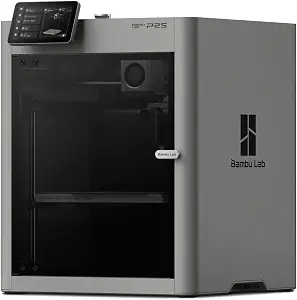
The Bambu Lab P2S 3D Printer is a single-color option as described in the listing, with speed, setup and workflow features that may appeal to shoppers who want to start printing without overlooking routine setup considerations. Its listed features include printing up to 600 mm/s, automatic calibration, AI failure detection and quick-swap nozzles. These are product claims, not a guarantee of results for every model or project. For a Black Friday purchase, first confirm that the offer is for the P2S rather than the Combo, then decide whether the listed features match how you expect to print.
Best for buyers prioritizing a high stated print-speed ceiling: that label reflects the listing’s “up to 600 mm/s” figure, not a comparative performance judgment. Also consider the 50 °C chamber detail, the stated 15-minute setup, and the printer’s dimensions when weighing the fit for your workspace and intended materials.
What the speed figure tells you before Black Friday
The P2S is listed as printing up to 600 mm/s. The words “up to” matter: this is a stated maximum, not a promise that every print will run at that speed. Your choice of model and project may affect what matters most to you, so treat the figure as one part of the buying decision rather than a reason by itself to expect a particular print time.
For Black Friday, compare the exact P2S listing and variant you intend to buy. If speed is a priority, make sure you are considering the same product version throughout your comparison. Then balance the advertised ceiling against the other listed details, including single-color printing and the printer’s setup and calibration features.
A 15-minute setup claim, in practical context
The product information says you can set up the P2S FDM 3D printer and start printing in just 15 minutes. That gives a shopper a concrete expectation to consider, but it should be read as the listing’s setup claim, not a promise about every person’s preparation or project. If you are buying a printer as a first step into FDM printing, think about whether the stated setup experience fits the kind of start you want.
During Black Friday shopping, keep setup separate from questions the provided product details do not answer. The 15-minute statement does not establish what materials, files or other items are included, so check the exact listing for the specifics relevant to your order. That way, you can compare the stated setup claim without assuming additional package contents.
Calibration and nozzle changes for a flexible workflow
Automatic calibration and quick-swap nozzles are listed features. They are relevant if you value calibration assistance or want the option to change nozzles as part of your printing routine. The product information does not specify nozzle sizes or explain the procedure, so avoid basing a decision on an assumed range of nozzle options or a particular changeover process.
For a Black Friday shortlist, consider whether these named features address needs you actually have. They may be useful points to compare across the exact printer versions you are considering, but their presence alone does not establish how a specific project will turn out. Check the product details if you need information beyond the features listed here.
AI failure detection: a feature to weigh, not a guarantee
The P2S listing includes AI failure detection. For a shopper, that is a meaningful item to note when considering how the printer is described, particularly if failure detection is among your priorities. The provided information does not explain what conditions it detects or how it responds, so do not assume it will identify every issue or prevent failed prints.
When evaluating a Black Friday offer, treat AI failure detection as one stated capability alongside automatic calibration and quick-swap nozzles. If you need a specific explanation of how detection works, confirm that detail in the listing before making it part of your decision. A clear understanding of the feature is more useful than relying on an interpretation beyond the available description.
Chamber temperature and material planning
The product information describes the P2S as maintaining a 50 °C chamber for engineering-grade materials. This is worth considering if chamber temperature is relevant to the materials you have in mind. The description does not name particular materials or establish compatibility with every engineering-grade option, so check the product details and your material requirements rather than treating the chamber statement as a universal compatibility claim.
A Black Friday price comparison is most useful when it is paired with that project check. If you are choosing the printer for a particular material, verify that the listing provides the information you need for that use. If your plans are still open, the stated chamber temperature remains a useful specification to keep in view without assuming more than the listing says.
Single-color printing and choosing the right version
The distinction between the P2S and the Combo version is especially important: the P2S 3D printer does not support multi-color printing, and the Combo version is required for that capability. If multi-color printing is central to your plans, do not treat this P2S listing as though it includes that function. If it is not a requirement, the single-color distinction still helps you identify the product accurately.
Black Friday listings can make variant checking an essential step. Confirm the product name and version shown on the offer before comparing it with another listing or completing your purchase. The product details provided here do not describe the Combo’s other specifications, so compare only the features that are stated for the version you are considering.
Black Friday listing checks and offer comparison
A deal label alone does not tell you whether an offer matches your needs. Compare the exact product name and version, then review the listing for the features you care about: speed up to 600 mm/s, the 15-minute setup claim, automatic calibration, AI failure detection, quick-swap nozzles, the 50 °C chamber and the single-color limitation. Do not assume that a separate version shares every stated detail.
Before deciding, check the offer’s current terms and product details directly. No sale price, discount amount or availability is established here, so there is no basis for assuming a particular Black Friday saving. Instead, compare the exact offer you see with your priorities and make sure the product description corresponds to the P2S you intend to buy.
Plan for the printer’s stated dimensions
The listed product dimensions are 18 x 21 x 18 inches. Use that exact format when checking whether the printer’s stated size fits the location you have in mind. The dimensions are a practical point to consider before ordering, particularly if you are choosing a specific place for the printer rather than deciding on the product first and sorting out placement later.
As part of Black Friday planning, check the available space against the product dimensions and consider your own setup needs. The listing’s dimensions do not specify additional clearance requirements, so avoid treating them as a complete workspace plan. Confirm any further space details you need through the product information before committing.
Key specs
Print speed
prints up to 600 mm/s
Setup
Set up your P2S FDM 3D printer and start printing in just 15 minutes.
Features
AI failure detection, quick-swap nozzles, and automatic calibration
Multi-color printing
The P2S 3D printer does not support multi-color printing; Combo version required.
Chamber temperature
maintaining a 50 °C chamber for engineering-grade materials.
Dimensions
Product Dimensions 18 x 21 x 18 inches
Make your Black Friday choice
The Bambu Lab P2S is worth considering if its listed features align with your priorities: a speed ceiling of up to 600 mm/s, a stated 15-minute setup, automatic calibration, AI failure detection, quick-swap nozzles and a 50 °C chamber for engineering-grade materials. Its single-color limitation is a key decision point, and its 18 x 21 x 18 inches dimensions deserve a place in your planning. For Black Friday, compare the exact P2S listing and offer rather than assuming a discount or confusing it with the Combo version. A careful variant and feature check is the clearest way to judge whether the available offer fits your needs.
 Check Price on Amazon