Amazon Kindle 16 GB (2024 model) – Black
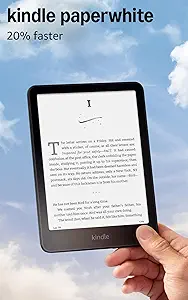
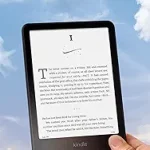
Amazon Kindle Paperwhite 16GB (2024 model) – Black
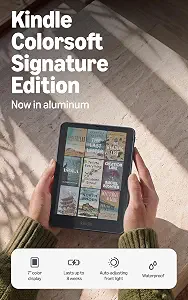
Kindle Colorsoft Signature Edition 32GB
Best Kindle Buying Guide — Black Friday Deals 2026
A Kindle shortlist is most useful when it starts with the kind of reading you actually do. The standard Kindle offers a compact 6“ glare-free display and 16 GB storage, while the Paperwhite adds a larger 7“ display, an adjustable white-to-amber setting, and a longer stated battery-life claim. Colorsoft is the option here with a paper-like color display. For Black Friday, treat those differences as a way to narrow your choices—not as proof of a deal. Check the exact model and storage in the offer, then decide which features would matter in your everyday reading.
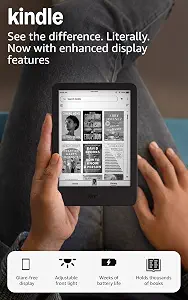
Amazon Kindle 16 GB (2024 model) – Black
Best Budget is an editorial fit for readers who want a straightforward Kindle with the listed core reading features. Its 6“ glare-free display gives you a clear starting point for novels, essays, and other text-focused reading. An adjustable front light lets you change the lighting, and dark mode offers another reading view. If those are the features you expect to use, this model keeps the decision focused rather than asking you to choose a color screen or a larger display.
The 16 GB storage is specified as holding thousands of books, which may suit someone building a varied digital reading list. Battery life is listed as up to 6 weeks on a single charge; treat that as a stated maximum, not a promise about every routine. For a reader who charges devices at regular intervals, it can still be useful information when comparing options. The product facts do not specify a charging connection, so check the listing if that detail matters to you.
During Black Friday, compare the exact offer with this 16 GB 2024 model rather than assuming a Kindle deal applies to every variant. The practical tradeoff is straightforward: choose it if the 6“ glare-free display, adjustable front light, dark mode, and stated storage are the combination you want. If your reading calls for a 7“ screen, a white-to-amber adjustment, or color, compare the other listed models before deciding. Best Budget describes this guide’s choice among these three products; it is not a claim of measured performance or a market-wide award.
Key specs
| Display | 6“ glare-free display |
| Front light | adjustable front light |
| Reading mode | dark mode |
| Storage | 16 GB storage holds thousands of books |
| Battery life | Get up to 6 weeks of battery life on a single charge. |
Amazon Kindle Paperwhite 16GB (2024 model) – Black
Check Price on Amazon
Best Overall is the guide’s editorial choice for a reader looking for a larger Paperwhite display alongside several specified reading features. The 7“ Paperwhite display is the first difference to weigh against the standard Kindle’s 6“ glare-free display. If a larger screen suits the way you prefer to read, that may be more relevant than a headline offer. The display can also be adjusted from white to amber, giving you a choice between those two color tones as you settle in with a book.
The listed battery claim is up to 12 weeks on a single charge via USB-C. That is a stated maximum rather than a guarantee for every reader, but it can help you compare the models’ published battery information. The product is described as waterproof, a feature to consider if water resistance is part of your buying priorities. Its distraction-free reading description says the Kindle doesn’t have social media, notifications, or other distracting apps. That makes the reading environment part of the choice, alongside screen size and lighting.
For Black Friday, check that the offer is specifically for the Kindle Paperwhite 16GB (2024 model) and compare its listed terms with the exact configuration you intend to buy. This model may be a suitable middle ground if you want a 7“ Paperwhite display and adjustable white-to-amber display, without choosing the color-display option. It is not automatically the best fit for every reader: the standard Kindle has a 6“ glare-free display, and Colorsoft has a paper-like color display. Best Overall is a label for this shortlist, not a tested ranking or a claim about all Kindles.
Key specs
| Display | 7“ Paperwhite display |
| Battery | A single charge via USB-C lasts up to 12 weeks. |
| Display adjustment | Adjust the display from white to amber |
| Distraction-free reading | Your Kindle doesn’t have social media, notifications, or other distracting apps. |
| Water resistance | Waterproof |
Kindle Colorsoft Signature Edition 32GB
Check Price on Amazon
Best for Color Reading is a distinct choice for shoppers who want color on the screen. The Kindle Colorsoft Signature Edition has a 7″ paper-like color display, so it is the one to consider when color is central to your reading plans. If your usual reading is text-focused, decide whether color itself would add enough value to make this your preferred option. This guide’s label simply highlights that listed feature; it does not establish that the model is superior for every type of book.
The lighting details include an auto-adjusting light, adjustable warm light, and Dark Mode. Double-tap page turns are another specified reading feature. Taken together, these give you several concrete points to compare with the simpler feature lists of the other models. The available facts don’t describe how the display renders any particular material, so consider the color screen as a display choice rather than assuming a specific result for a title or format.
Colorsoft is listed with 32GB storage and battery life of up to 8 weeks on a single charge. Its waterproof description and a back panel that opens for a quick battery swap are also stated features. For Black Friday, verify that the exact offer names the Kindle Colorsoft Signature Edition 32GB; don’t use a deal for another Kindle as a stand-in when comparing. Its appeal in this group is the combination of a color display and these listed features. Compare that bundle with the Paperwhite if you are deciding whether color or its 7“ Paperwhite display better fits your reading.
Key specs
| Display | 7″ paper-like color display |
| Lighting | auto-adjusting light |
| Battery life | Up to 8 weeks on a single charge |
| Reading features | double-tap page turns |
| Light settings | adjustable warm light and Dark Mode |
| Water resistance | Waterproof |
| Battery replacement | the back panel opens for a quick battery swap |
Begin with the material you want on screen
Think about what you read before you look at a Black Friday headline. If most of your reading is text, the standard Kindle’s 6“ glare-free display may be the relevant starting point. The Paperwhite offers a 7“ Paperwhite display, while Colorsoft’s 7″ paper-like color display makes color the distinguishing screen feature in this selection. Those descriptions give you a practical first filter: choose the screen type that matches your priorities, rather than assuming that a bigger-sounding deal is necessarily a better fit.
Consider your reading list, not just a single book. A person who mainly reads novels might prioritize a comfortable text display, while someone who specifically wants color on the screen may prefer to investigate Colorsoft. These are conditional choices, not claims about how any particular book will look. The provided facts do not describe supported formats or display performance for individual content, so check the product listing for details relevant to your library. A Black Friday comparison is more useful once you know which screen options you are willing to consider.
Read the lighting descriptions as separate choices
The lighting details differ, so be precise about which one you want. The standard Kindle lists an adjustable front light and dark mode. Paperwhite lets you adjust the display from white to amber. Colorsoft lists an auto-adjusting light, adjustable warm light, and Dark Mode. These details are not interchangeable: compare the description for the exact model you are considering instead of assuming that one device has every lighting option mentioned for another.
Before Black Friday, picture the settings you would actually use: changing the front light, selecting a warmer display tone, or switching to dark mode. That simple exercise can help you avoid paying attention to a feature name that does not matter in your routine. The facts do not establish a preferred setting for a particular room, time of day, or reader, so the choice is personal. If lighting is a deciding factor, verify the exact model name and read its listing carefully before comparing offers.
Use battery and storage claims for planning
The stated battery figures are not identical: the standard Kindle lists up to 6 weeks, Paperwhite up to 12 weeks via USB-C, and Colorsoft up to 8 weeks on a single charge. Each is an “up to” claim, so use it as a published comparison point rather than a guarantee of how long your own charge will last. Think about how often you prefer to charge devices, but avoid treating the largest number as a prediction for every reading pattern.
Storage is another clear point of comparison. The standard Kindle’s 16 GB is described as holding thousands of books, Paperwhite is named as a 16GB model, and Colorsoft is listed as 32GB. Those facts can help you compare configurations, but they do not tell you how many particular files will fit. During Black Friday, confirm the storage shown on the exact product offer; a similar name alone is not enough to establish that the variant matches your plan.
Make water resistance and extras part of the fit
Both Paperwhite and Colorsoft are described as waterproof. That may be a useful point to consider if water resistance is important in your choice, but the supplied descriptions do not specify conditions or limits. Avoid assuming a particular use is covered; consult the product information if you need guidance about how the feature applies. The standard Kindle’s provided facts do not state whether it has water resistance, so do not treat that omission as confirmation either way.
Colorsoft also lists double-tap page turns and a back panel that opens for a quick battery swap. Those are specific details to weigh if they sound useful to you. Paperwhite’s stated distraction-free reading description says it does not have social media, notifications, or other distracting apps. These features can help distinguish the shortlist, but they matter differently to different people. A Black Friday offer is worth comparing only after you have decided whether one of these details changes your preference.
Compare the Black Friday offer line by line
A sale label does not tell you which Kindle variant is included. Check the full product name, model year where stated, and storage shown on the offer. In this guide, that means distinguishing the Kindle 16 GB (2024 model), Kindle Paperwhite 16GB (2024 model), and Kindle Colorsoft Signature Edition 32GB. Confirm that the offer you are viewing matches the product you meant to compare; do not carry an advertised deal across to another model based on a shared Kindle name.
Then review the listed features against your own shortlist: screen type, lighting, battery claim, storage, and any additional detail that matters to you. No active Black Friday promotion or price is established here, so judge the offer using the information shown at the time you shop. If the terms or variant are unclear, take time to verify them before deciding. This approach keeps the decision focused on a real product and its stated features, rather than urgency or a headline that may not describe the configuration you want.
Make your Black Friday choice
The best Kindle choice in this group depends on the feature you would notice most: a 6“ glare-free display and 16 GB storage, a 7“ Paperwhite display with white-to-amber adjustment, or a paper-like color display with 32GB storage. Use the battery and lighting descriptions as comparison points, and verify the exact variant whenever you review a Black Friday offer. There is no need to treat one label as a universal winner: choose the combination that fits your reading plans, then make your decision from the details of the offer in front of you.