Best Dell Monitor Buying Guide — Black Friday Deals 2026
A Dell monitor can serve very different routines, from everyday work and browsing to gaming where a high refresh rate is a priority. This guide compares three listed models by the choices their specifications make possible, rather than treating one screen as the right fit for everyone. The Dell 24 Monitor SE2426H pairs a compact screen with Full HD resolution, while the Dell 27 Plus QHD Monitor S2725DSM adds QHD resolution and several stand-adjustment options. The Dell 27 240Hz Gaming Monitor SE2726HG is the high-refresh choice in this group. During Black Friday, compare the exact model and variant shown in an offer with the details here; no promotion or price is assumed.
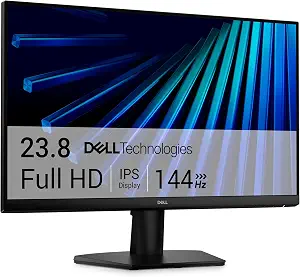
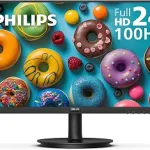
Best Budget is the editorial label for the Dell 24 Monitor SE2426H in this selection. Its 23.8-inch screen and 1920×1080 resolution make it the Full HD option for shoppers who want a smaller display than the two 27-inch models listed here. IPS panel technology and a 178-degree viewing angle are also specified. These details can help you decide whether its screen size and viewing characteristics match your desk and routine; they do not establish how it will look in every room or from every position. The label is a comparison within this group, not a claim that it is the least expensive offer or a market-wide award.
The SE2426H is not limited in the listed facts to a low refresh rate: it specifies 144 hertz, a 1-millisecond response time, and FreeSync. Those features make it worth considering if you want a Full HD screen with gaming-related specifications without moving to the 240Hz model. Its two HDMI ports may also be relevant when choosing how to connect devices. Check your own setup and the exact listing details rather than assuming a particular cable, accessory, or additional connection is included. If your main priority is QHD resolution, the S2725DSM provides that resolution; if your priority is the highest stated refresh rate in this guide, consider the SE2726HG instead.
A practical case for choosing this model is a desk where a 23.8-inch screen suits the available space and Full HD is the resolution you want. Think about what you will view, how much room you have, and whether you would benefit from the larger screens or QHD option elsewhere in this guide. For Black Friday, compare the offer for the exact SE2426H model rather than relying on a broad Dell monitor label or a similar-looking product title. Confirm the listed specification details and variant before deciding whether the offer matches your priorities. Best Budget helps identify its role among these picks, but the right choice depends on your requirements and the offer you actually find.
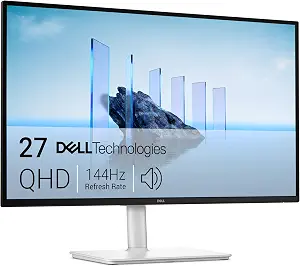
Dell 27 Plus QHD Monitor – S2725DSM (ASIN B0GD1LMWH3)
Best Overall is the editorial fit for the Dell 27 Plus QHD Monitor S2725DSM because it brings together QHD resolution, IPS display technology, a 144Hz refresh rate, built-in speakers, and several ways to adjust its position. Those are useful points of consideration for someone who wants one screen to accommodate different tasks through the day. The 2560×1440 resolution distinguishes it from the Full HD choices in this guide, while the height, tilt, pivot, and swivel adjustments let a shopper consider how they prefer to position a monitor. The label reflects this combination among these three listed models, not a claim of measured superiority.
For a desk shared by work, browsing, and entertainment, the S2725DSM offers a collection of features worth checking against the way the display will be used. Its 2 x 3W speakers are listed as part of the monitor, so they may matter to shoppers considering built-in audio rather than focusing only on the screen. Connectivity is listed as HDMI and DisplayPort 1.4. Before checkout, confirm that the connection types line up with the devices and cables you plan to use; the listing facts do not specify how many ports of each type are included. The adjustable stand is also a practical consideration if you want to change screen position rather than leave it in one fixed orientation.
The tradeoff is not that this model is unsuitable for any particular task; rather, it is a question of which listed features matter enough for your setup. If you primarily want a 240Hz refresh rate, the SE2726HG is the specifically identified high-refresh model here. If you want the lowest-complexity choice among the specifications shown, compare the S2725DSM’s QHD resolution and multiple adjustments with what you will actually use. Black Friday listings can make model names easy to skim past, so check that the offer is for S2725DSM and compare the exact variant and included details before deciding. Choose Best Overall as a useful shortlist label, not as a guarantee that it fits every desk or preference.
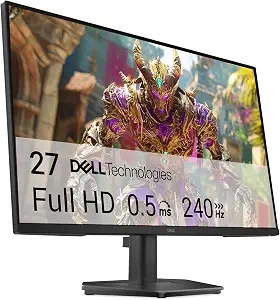
Best for high-refresh gaming is the editorial label for the Dell 27 240Hz Gaming Monitor SE2726HG. Its defining listed feature is a 240 hertz refresh rate, paired with a 1920 x 1080 pixels resolution and IPS display technology. That combination gives shoppers a clear decision to weigh: prioritize the model’s stated refresh rate, or choose a different resolution and feature mix. AMD FreeSync Premium is also specified. These facts make the SE2726HG the most direct match in this group for a shopper whose shortlist starts with a high refresh rate, but they do not promise a particular gaming experience or results with any specific game or system.
The 27-inch screen may suit someone looking for a larger display than the SE2426H, while its Full HD resolution sets it apart from the QHD S2725DSM. That is a concrete tradeoff to consider when choosing what you want the screen to emphasize. For connections, the listed inputs are 2X HDMI and DisplayPort 1.4. Tilt adjustment is specified, so consider whether that positioning option works for your desk; the facts provided do not describe other adjustments. Before buying, check the devices you intend to connect and the exact listing variant, rather than assuming that a port count or accessory detail beyond the stated inputs is included.
During Black Friday, the SE2726HG is worth comparing when its stated refresh rate is more important to you than choosing the QHD resolution of the S2725DSM or the smaller screen of the SE2426H. That is a choice among the listed specifications, not a claim that one is universally better. Read the product name closely and verify the exact model number in the offer; a listing that simply says Dell gaming monitor may not identify the same product. Also consider whether Full HD on a 27-inch screen fits your own preferences before committing. The Best for high-refresh gaming label indicates why it appears here, while leaving the final fit to your setup, priorities, and exact offer.
Key specs
Screen size
27 inches
Resolution
1920 x 1080 pixels
Refresh rate
240 hertz
Display technology
IPS
Adaptive sync
AMD FreeSync Premium
Video inputs
2X HDMI, DisplayPort 1.4
Screen adjustment
Tilt Adjustment
Build your shortlist around a real desk routine
Start with the place and purpose for the display, not a sale banner. If desk space is a central concern, the SE2426H is the only listed model with a 23.8-inch screen; the other two are 27-inch models. That makes screen size an easy first distinction, but it does not by itself determine which will feel right. Consider how close you sit, what you keep on the desk, and whether the monitor will be used for one primary task or several. Those are personal setup questions rather than product claims.
Next, identify what you want to prioritize. The S2725DSM’s QHD resolution and height, tilt, pivot, and swivel adjustments may appeal if resolution and positioning options are high on your list. The SE2726HG is the option to examine first if the stated 240 hertz refresh rate is your key requirement. The SE2426H combines a smaller screen with Full HD resolution and two HDMI ports. Black Friday browsing can encourage quick comparisons, but writing down your must-haves beforehand helps keep the exact model and its relevant details in focus.
Black Friday offer checks: match the model, not just the name
A deal page may put several Dell displays side by side, so verify the complete model name before comparing an offer with this guide. SE2426H, S2725DSM, and SE2726HG refer to different listed products, with different screen sizes, resolutions, and feature combinations. Confirm the variant in the product title and details, and make sure the offer you are considering is actually for the model you intended to shortlist. This guide does not establish an active Black Friday promotion, a price, or a discount.
Then compare the exact offer details that are available to you. Look for the relevant stated resolution, refresh rate, connections, and adjustment options rather than assuming that a general product-family name identifies every detail. For example, the SE2726HG lists HDMI and DisplayPort 1.4 inputs, while the S2725DSM lists HDMI and DisplayPort 1.4 connectivity without specifying the number of each. Avoid filling gaps with assumptions. A careful Black Friday comparison is about confirming that the model and details fit your needs, not simply choosing a listing because its headline sounds persuasive.
Decide what resolution means for your shortlist
The three models give you two resolution choices to compare: the SE2426H and SE2726HG specify Full HD, while the S2725DSM specifies QHD. Think about the kind of detail and screen area you want for your regular tasks, then consider resolution alongside the screen size rather than in isolation. The SE2426H combines its resolution with a 23.8-inch screen; both other models are listed as 27 inches. These are straightforward product distinctions, but individual preferences about what looks comfortable or useful can differ.
A larger screen does not automatically make one resolution the right choice for you, and the facts here do not predict how a particular application will appear. If QHD is a priority, the S2725DSM is the listed option that specifies it. If you would rather choose between Full HD models, compare their other details: one lists 144 hertz and two HDMI ports, while the gaming model lists 240 hertz and HDMI plus DisplayPort 1.4 inputs. During Black Friday, use these distinctions to narrow offers to the exact resolution and model you want instead of treating all Dell monitors as interchangeable.
Treat refresh rate as a preference, not a promise
Refresh rate is one of the clearest differences in this group. The SE2426H and S2725DSM each specify 144 hertz, and the SE2726HG specifies 240 hertz. If gaming is part of your routine, decide whether a higher stated refresh rate is an important selection criterion for you. The SE2726HG also lists AMD FreeSync Premium, while the SE2426H lists FreeSync. These are provided features, not guarantees about how a display will perform with every computer, game, or configuration.
Consider response time only where it is specified: the SE2426H and S2725DSM each list 1 milliseconds, while the provided facts for the SE2726HG do not state a response time. Missing information should not be treated as evidence for or against a feature. Check the details for your exact model and intended setup before making a decision. Black Friday product pages may emphasize a single gaming-related specification; keep the rest of your priorities in view, including resolution, screen size, connections, and the positioning options you want.
Check connections, sound, and screen positioning
Connection details can help you rule out a mismatch before checkout. The SE2426H lists two HDMI ports. The SE2726HG lists 2X HDMI and DisplayPort 1.4, and the S2725DSM lists HDMI and DisplayPort 1.4 connectivity. The last description does not give a port count, so do not assume one. Compare those stated inputs with the devices you plan to use, and verify the precise product details for the offer rather than relying on assumptions about cables, adapters, or included accessories.
Positioning and sound may also matter in everyday use. The S2725DSM lists height, tilt, pivot, and swivel adjustability, whereas the SE2726HG lists tilt adjustment. No adjustment details are supplied here for the SE2426H, so consult its exact listing if stand movement is important to you. The S2725DSM also specifies 2 x 3W speakers. Decide whether built-in speakers and a more adjustable stand are useful for your routine, or whether another model’s screen size or refresh-rate details matter more. For Black Friday, compare these practical details alongside the offer itself.
Make your Black Friday choice
The best Dell monitor for your shortlist depends on which compromise feels most acceptable: Full HD in a smaller screen, QHD with multiple stand adjustments, or a 27-inch Full HD model with the highest stated refresh rate in this group. Use the model names to keep those choices distinct, then confirm the exact variant and details before checkout. Black Friday may be a useful time to compare offers, but this guide does not claim that any particular promotion is available. Choose the product whose listed features address your priorities, not simply the one with the most prominent headline.